Part V gave a language model knowledge (RAG), hands (tool calling) and a universal plug (MCP). Each piece works, but gluing them together by hand gets repetitive: the same prompt-filling, the same JSON parsing, the same retrieval code, in every project. Part VI is about turning those pieces into systems, and it starts with the frameworks that package the plumbing.
Two names dominate. LangChain is a general toolkit for connecting models to prompts, tools, memory and data. LlamaIndex focuses on one hard thing: getting your documents into a form a model can use. This session runs both on the local model from Session 23, so nothing here needs an API key, and ends with an honest answer to "which one, and do I need either?".
LangChain: building blocks for LLM apps
LangChain was started by Harrison Chase in October 2022, just before ChatGPT made LLM apps a mainstream idea. It gives you standard parts:
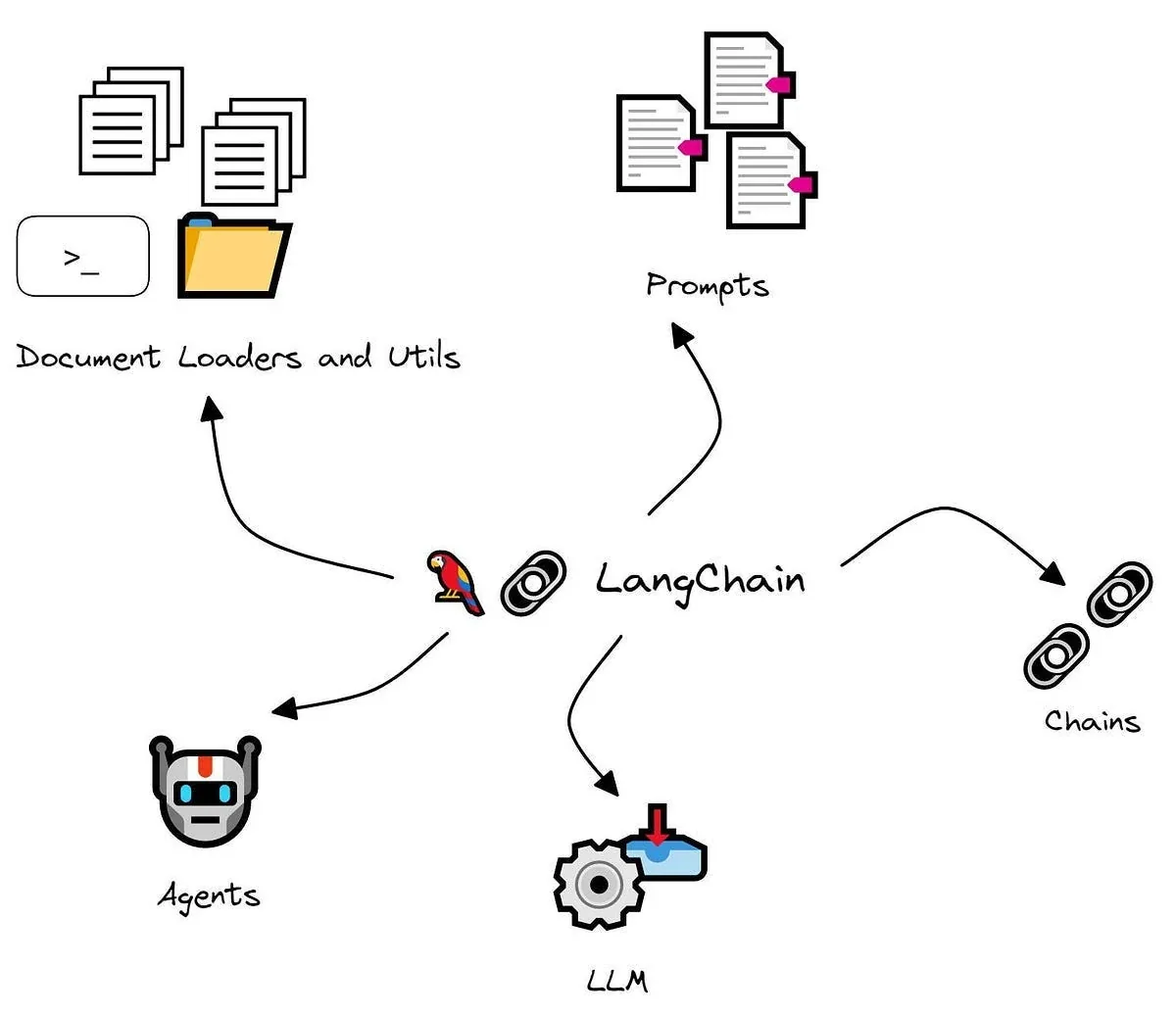
- Prompt template: a reusable recipe with blanks, filled in at run time.
- Model: a standard interface over many providers, so swapping a model is one line.
- Output parser: turns the model's reply into plain text, JSON or a typed object.
- Chain: a fixed sequence of steps.
- Tool, agent, retriever, vector store, memory: the parts from Sessions 22 to 24, with ready-made versions.
Chains with the | operator
Modern LangChain joins steps with a pipe, like Unix commands. Each step is a Runnable, and prompt | model | parser is a pipeline in which the output of one step becomes the input of the next. This is called LCEL (LangChain Expression Language). Below, a small wrapper makes our local model look like any LangChain model. With a hosted model that class would simply be ChatAnthropic(model=...) or ChatOpenAI(...):
from langchain_core.language_models.llms import LLM
from langchain_core.output_parsers import StrOutputParser
from langchain_core.prompts import ChatPromptTemplate
from langchain_core.runnables import RunnableLambda

class LocalModel(LLM):
    """Wraps our local model so LangChain can use it like any other LLM (a hosted one would be one line: ChatAnthropic(...))."""
    @property
    def _llm_type(self): return "local-qwen"
    def _call(self, prompt, stop=None, run_manager=None, **kwargs):
        return ask(prompt)

prompt = ChatPromptTemplate.from_template("Explain {topic} to a Class 10 student in two sentences.")
print("the filled-in prompt:", prompt.invoke({"topic": "gradient descent"}).to_string()[:80], "...\n")

chain = prompt | LocalModel() | StrOutputParser()             # the | operator joins steps: prompt -> model -> parser
print(chain.invoke({"topic": "gradient descent"}), "\n")

# any Python function can join the chain
shout = RunnableLambda(lambda text: text.split(".")[0].upper() + ".")
print("first sentence, shouted:", (chain | shout).invoke({"topic": "overfitting"}), "\n")

results = chain.batch([{"topic": "a loss function"}, {"topic": "an epoch"}])                # several inputs at once
print("batch of 2 ->", [len(r.split()) for r in results], "words each")the filled-in prompt: Human: Explain gradient descent to a Class 10 student in two sentences. ...
Gradient descent is a method used to find the minimum value of a function. It's like finding the lowest point on a hill by always moving downhill.
first sentence, shouted: OVERFITTING IS WHEN A MODEL LEARNS THE TRAINING DATA TOO WELL, INCLUDING ITS NOISE AND OUTLIERS, LEADING TO POOR GENERALIZATION TO NEW DATA.
batch of 2 -> [25, 20] words eachFirst the template, filled in: Explain gradient descent to a Class 10 student in two sentences. Then the whole chain run with one call, chain.invoke({"topic": ...}). Any Python function can join the chain too, and here a tiny RunnableLambda took the model's first sentence and shouted it. The last line used chain.batch to run two topics together. Notice what you did not write: no string formatting, no loop and no message plumbing. That is the framework's whole value: a uniform interface (invoke, batch, stream) over every step.
Structured output: typed objects, not loose text
Session 24 ended with "validate everything". LangChain gives a neat way: describe the shape you want with Pydantic, add its instructions to the prompt, and parse the reply into a typed Python object, failing loudly if it does not fit:
import json
from pydantic import BaseModel, Field
from langchain_core.output_parsers import PydanticOutputParser
from langchain_core.prompts import ChatPromptTemplate

class Review(BaseModel):
    sentiment: str = Field(description="positive, negative or neutral")
    score: int = Field(description="1 to 5")

parser = PydanticOutputParser(pydantic_object=Review)
prompt = ChatPromptTemplate.from_template(
    "Classify this course review.\n{format_instructions}\nReview: {review}\nReply with the JSON only.")

reviews = ["I loved this course, the examples were great!", "Too fast and confusing, I wanted my money back.", "It was fine.", "Best teacher ever!!!"]
ok = 0
for text in reviews:
    raw = ask(prompt.invoke({"review": text, "format_instructions": parser.get_format_instructions()}).to_string(), max_tokens=60)
    try:
        review = parser.parse(raw)                              # a typed Python object, not loose text
        ok += 1
        print(f"{text[:44]:46s} -> {review}")
    except Exception as e:
        print(f"{text[:44]:46s} -> FAILED to parse: {raw[:50]!r}")
print(f"\nparsed correctly: {ok} of {len(reviews)}")I loved this course, the examples were great -> sentiment='positive' score=5
Too fast and confusing, I wanted my money ba -> sentiment='negative' score=1
It was fine. -> sentiment='neutral' score=3
Best teacher ever!!! -> sentiment='positive' score=5
parsed correctly: 4 of 4Each review became a real Review(sentiment=..., score=...) object, 4 of 4 parsed correctly: "positive 5", "negative 1", "neutral 3", "positive 5". The surrounding code can now rely on review.score being an integer. Note this is a small, easy task. With harder schemas a small model will fail to produce valid JSON some of the time, so keep the try/except (the code above has one) and consider retries. Hosted models offer with_structured_output(Review), which constrains the model's output more strongly.
from pydantic import BaseModel
from langchain_anthropic import ChatAnthropic

class Review(BaseModel):
    sentiment: str
    score: int

llm = ChatAnthropic(model="claude-sonnet-5-5")          # check the provider's current model name
structured = llm.with_structured_output(Review)
print(structured.invoke("I loved this course, great examples!"))     # a Review object
LlamaIndex: when the hard part is your data
LlamaIndex (originally called GPT Index) started in late 2022 and concentrates on data: loading documents, splitting them, embedding them and retrieving the right pieces. Its vocabulary is the RAG pipeline of Session 22 with its own names:
- Document: a loaded source (a PDF, a web page, a database row).
- Node: a chunk of a document with metadata.
- Index: a structure over nodes for fast retrieval (vector, keyword, summary or graph).
- Retriever: fetches the best nodes for a question.
- Query engine: retrieve and generate in one call (question in, answer out).
- Chat engine: a query engine with conversation memory.
- Data connectors (LlamaHub) and LlamaParse: loaders for many sources, and a parser for difficult documents like PDFs with tables.
Here is the Session 22 pipeline again, now in a handful of lines. We tell LlamaIndex which embedding model and which language model to use (ours are local) and then build an index and a query engine:
from llama_index.core import Document, Settings, VectorStoreIndex
from llama_index.core.base.embeddings.base import BaseEmbedding
from llama_index.core.llms import CustomLLM, CompletionResponse, CompletionResponseGen, LLMMetadata
from llama_index.core.llms.callbacks import llm_completion_callback
from sentence_transformers import SentenceTransformer

DOCS = [
 "Refund policy: fees are refundable within 7 days of enrolment if fewer than 3 classes were attended. After that, no refund is given.",
 "Class timings: Pre-medical batches run Monday to Friday, 4 pm to 7 pm. Pre-engineering batches run 2 pm to 5 pm.",
 "Monthly fee: the pre-medical course costs Rs. 9,500 per month and the pre-engineering course costs Rs. 8,000 per month.",
 "Scholarship: students who score above 85 percent in Matric receive a 20 percent fee discount for the first year.",
 "Mock tests are held on the first Saturday of every month. Results are published on the portal within 48 hours.",
]

class MiniLMEmbedding(BaseEmbedding):                       # the embedding model from Session 22
    _m: object = None
    def _model(self):
        if self._m is None: self._m = SentenceTransformer("all-MiniLM-L6-v2")
        return self._m
    def _get_text_embedding(self, text): return self._model().encode(text).tolist()
    def _get_query_embedding(self, q): return self._get_text_embedding(q)
    async def _aget_query_embedding(self, q): return self._get_text_embedding(q)

class LocalLLM(CustomLLM):                                  # our local chat model, wrapped for LlamaIndex
    @property
    def metadata(self): return LLMMetadata(context_window=4096, num_output=200, model_name="local-qwen")
    @llm_completion_callback()
    def complete(self, prompt, **kw): return CompletionResponse(text=ask(prompt, max_tokens=80))
    @llm_completion_callback()
    def stream_complete(self, prompt, **kw) -> CompletionResponseGen: yield CompletionResponse(text=ask(prompt, max_tokens=80), delta="")

Settings.embed_model, Settings.llm = MiniLMEmbedding(), LocalLLM()

index = VectorStoreIndex.from_documents([Document(text=d) for d in DOCS])      # chunk + embed + store, in one call
engine = index.as_query_engine(similarity_top_k=2)                              # retrieve + generate, in one call

question = "What does the pre-medical course cost per month?"
response = engine.query(question)
print("Q:", question)
print("A:", str(response).strip())
print("\nsources it used:")
for node in response.source_nodes:
print(f" {node.score:.2f} {node.text[:62]}...")Q: What does the pre-medical course cost per month?
A: Rs. 9,500 per month.
sources it used:
0.79 Monthly fee: the pre-medical course costs Rs. 9,500 per month ...
0.43 Scholarship: students who score above 85 percent in Matric rec...VectorStoreIndex.from_documents(...) chunked, embedded and stored the documents in one call, and index.as_query_engine() gave us retrieve-plus-generate in another. The answer, "Rs. 9,500 per month", comes with its sources: the fee document (similarity 0.79) and a less relevant scholarship document (0.43). Compare that with the 30-odd lines of Session 22. The trade-off is that the framework made many choices for you (chunk size, prompt wording), so know what its defaults are before you rely on it.
from llama_index.core import SimpleDirectoryReader, VectorStoreIndex

docs = SimpleDirectoryReader("data").load_data()              # a folder of PDFs and text files
index = VectorStoreIndex.from_documents(docs)
engine = index.as_query_engine(similarity_top_k=3)
print(engine.query("What is the refund policy?"))
(By default LlamaIndex expects an OpenAI key for both embeddings and the model. Set Settings.embed_model and Settings.llm to use others, as we did.)
LangChain, LangGraph, LlamaIndex: which one?
| LangChain (+ LangGraph) | LlamaIndex | |
|---|---|---|
| Main focus | General LLM apps, tools, agents, workflows | Data ingestion, indexing and RAG |
| Strength | Orchestration, agents, integrations, state | Document parsing, advanced retrieval |
| RAG | You assemble the pieces | Built in, high level, fewer lines |
| Agents and control flow | Strong (graphs, checkpoints, human approval) | Supported, less central |
| Best for | Multi-step logic and agents | Document Q&A, knowledge bases |
| Tracing | LangSmith | Third-party tools |
A simple rule: use LlamaIndex when the hard part is your data, use LangChain or LangGraph when the hard part is the workflow, and combine them when you need both. And for a very simple app, the plain provider SDK from Session 21 is often enough.
Frameworks save time on common patterns and give you a shared vocabulary, tracing and a large library of integrations. They also add layers to learn, change quickly between versions (some examples online no longer run) and can hide what is really sent to the model. A good habit: understand the plain version first, which is what Parts II to V were for, then adopt a framework where it removes real work. Anthropic's own guidance on building agents makes the same point: start with the simplest thing that works.
LangChain began as a personal open-source project by Harrison Chase in October 2022, a month before ChatGPT launched. It grew into a company and one of the most-used LLM libraries.LangChain project history
What does the | operator do in a LangChain chain like prompt | model | parser?
You need to answer questions over thousands of messy PDFs with tables, and the workflow itself is simple. Which tool is the natural starting point?
Try it yourself
- In
lcel_chain.py, change the prompt to ask for a Roman-Urdu explanation and add a second variable,{level}. Call the chain for three levels withbatch. - In
structured.py, add a third fieldtopic: strtoReview. Does the model still return valid JSON for all four reviews? - In
llamaindex_rag.py, changesimilarity_top_kto 1 and then 4. How do the answer and the sources change? - Rewrite the LlamaIndex pipeline in plain Python from Session 22. Which version would you rather maintain?
What comes next
A chain is a fixed line of steps. Real tasks need loops, branches, retries, pauses and memory. Session 27 introduces LangGraph, which models a workflow as a graph with shared state, and LangSmith, which lets you see what happened inside it.
Frequently asked questions
What is LangChain used for?
LangChain is a framework that packages the common building blocks of LLM applications: prompt templates, a standard interface to many models, output parsers, tools, retrievers, memory and agents. You join them into chains with the pipe operator so you write less plumbing code.
What is the difference between LangChain and LlamaIndex?
LangChain is a general toolkit for building LLM applications, strong at tools, agents and workflows. LlamaIndex focuses on data: loading, parsing, indexing and retrieving documents for RAG. Many projects use LlamaIndex for retrieval and LangChain or LangGraph for the workflow.
What is LCEL?
LCEL is the LangChain Expression Language, the pipe syntax for composing steps. Components share a common Runnable interface with invoke, batch and stream, so prompt | model | parser works as a single pipeline.
Do I need a framework to build an LLM app?
No. For simple apps the provider SDK is enough, and understanding the plain version first helps. Frameworks pay off when you need many integrations, repeated patterns, tracing or complex control flow.
Why does structured output need validation?
Because a model can return malformed or wrong-typed JSON. Parsing into a Pydantic model checks the shape and types, and raises an error you can handle, for example by retrying, instead of letting bad data flow into the rest of your program.