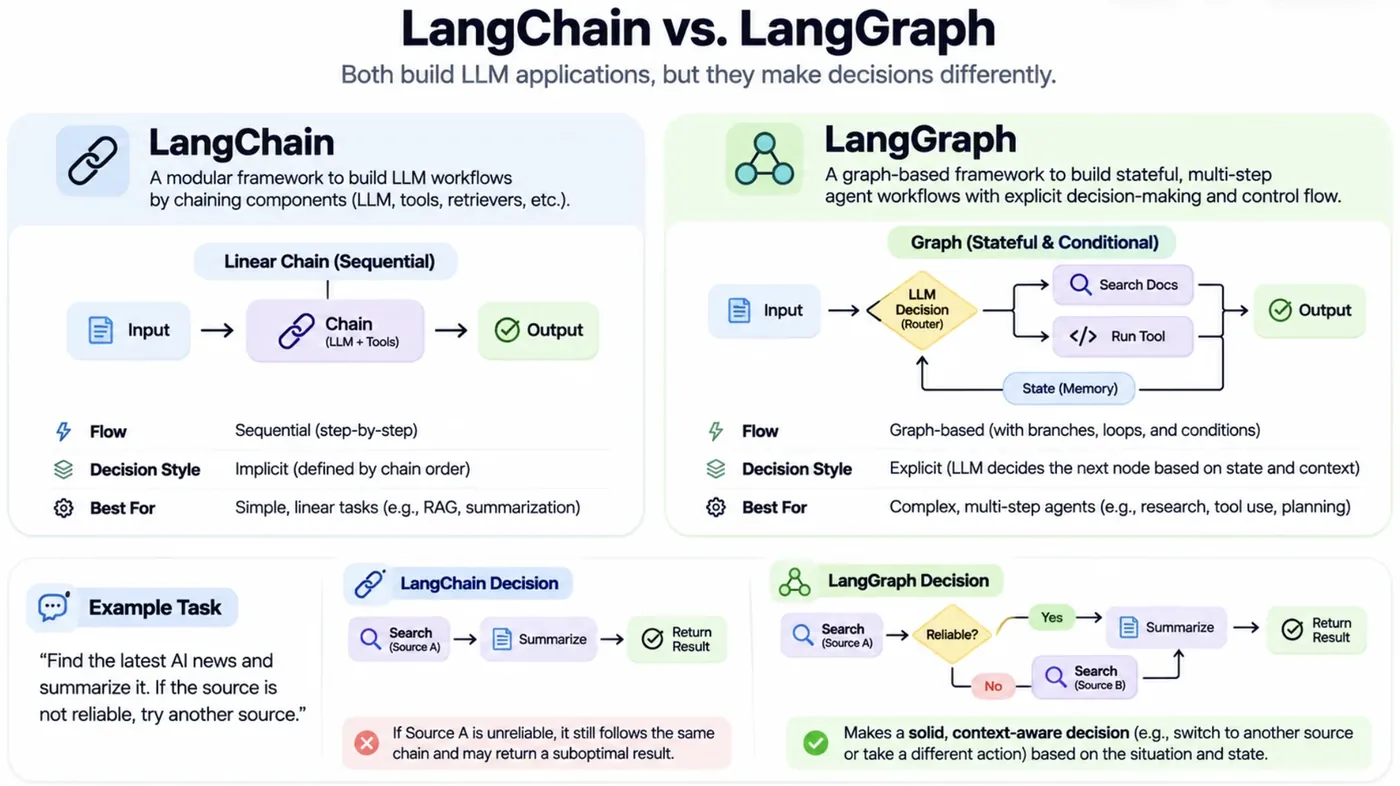
A LangChain chain (Session 26) is a straight line: A, then B, then C. Real tasks are not straight. A draft must be checked, and if it fails, rewritten. A long job crashes at step 7 of 9 and you do not want to repeat steps 1 to 6. A risky action must wait for a human to say yes. And a chatbot must remember yesterday's conversation.
LangGraph, from the LangChain team, models a workflow as a graph instead of a line. Boxes are steps, arrows are transitions, and a shared state flows through. A graph can loop, branch, pause and resume. LangSmith is its companion for seeing what happened. This session builds each idea with code that really runs, including a deliberate crash.
The vocabulary
- State: the shared data passed between steps (a typed dictionary).
- Node: a step (an LLM call, a tool, any Python function) that reads the state and returns updates.
- Edge: a fixed transition between nodes.
- Conditional edge: a branch where a small function reads the state and returns the next node. This is how loops and retries are built.
- Checkpointer: saves the state after every node (in memory, SQLite or Postgres).
- Thread (
thread_id): one conversation or run whose saved state can be resumed later. - Interrupt: pauses the graph, typically for human approval, then resumes.
A graph with a loop
Let's build a writer and a reviewer. The writer asks our local model for a one-sentence explanation. The reviewer checks a concrete rule (here, that the draft mentions the word "chlorophyll"). If the rule is not met, an edge sends control back to the writer with the reviewer's feedback, up to a retry limit.
from typing import TypedDict
from langgraph.graph import END, START, StateGraph

class State(TypedDict):                        # the shared state that every node reads and updates
    topic: str
    draft: str
    feedback: str
    tries: int

def write(state: State) -> dict:
    hint = f" Fix this problem from last time: {state['feedback']}" if state["feedback"] else ""
    draft = ask(f"Explain {state['topic']} in ONE short sentence.{hint}", max_tokens=60, temperature=0.0)
    return {"draft": draft, "tries": state["tries"] + 1}

def review(state: State) -> dict:
    ok = "chlorophyll" in state["draft"].lower()           # a simple, checkable requirement
    return {"feedback": "" if ok else "it must mention the word 'chlorophyll'"}

def route(state: State) -> str:                # a conditional edge: decide the next node from the state
    if state["feedback"] == "" or state["tries"] >= 4:
        return END
    return "write"                              # loop back

g = StateGraph(State)
g.add_node("write", write); g.add_node("review", review)
g.add_edge(START, "write"); g.add_edge("write", "review")
g.add_conditional_edges("review", route)
app = g.compile()

for step in app.stream({"topic": "photosynthesis", "draft": "", "feedback": "", "tries": 0}):
    node, update = next(iter(step.items()))
    shown = {k: (v if k != "draft" else v[:60]) for k, v in update.items()}
print(f"{node:7s} -> {shown}")write -> {'draft': 'Photosynthesis is the process by which plants convert light ', 'tries': 1}
review -> {'feedback': "it must mention the word 'chlorophyll'"}
write -> {'draft': 'Photosynthesis is the process by which plants convert light ', 'tries': 2}
review -> {'feedback': ''}Follow the stream. write produced a draft (try 1), then review returned the feedback "it must mention the word 'chlorophyll'". The conditional edge sent the flow back to write, which saw the feedback in its prompt and produced a second draft (try 2). This time review returned an empty feedback, which means approved, and the graph ended. Three ideas are visible: the state (topic, draft, feedback, tries) is shared and updated by each node, the conditional edge route decides what happens next, and the limit (tries >= 4) stops a stubborn loop.
One honest note from building this. My first version asked the model to rewrite a sentence in at most 10 words. The 1.5-billion-parameter model failed that check four times in a row, because counting words is something small models do badly, and the loop dutifully ended at its limit. Pick checks that the model can actually act on, and always keep the limit.
class State(TypedDict):
    topic: str
    draft: str
    feedback: str
    tries: int

def route(s: State) -> str:                       # a conditional edge: choose the next node from the state
    return END if s["feedback"] == "" or s["tries"] >= 4 else "write"

g = StateGraph(State)
g.add_node("write", write); g.add_node("review", review)
g.add_edge(START, "write"); g.add_edge("write", "review")
g.add_conditional_edges("review", route)
app = g.compile()
(Node names must differ from state keys.)
Checkpoints: crash recovery
Now the feature that justifies a graph framework. A three-step job: fetch 500 records (expensive), summarise them, publish. The second step crashes the first time, as if the connection dropped. With a checkpointer, the state was saved after step 1, so we can resume the same thread without redoing it:
from typing import TypedDict
from langgraph.checkpoint.memory import MemorySaver
from langgraph.graph import END, START, StateGraph

class State(TypedDict):
    log: list

calls = {"fetch": 0, "summarise": 0, "publish": 0}
crash_once = {"armed": True}

def fetch(s):                                   # step 1: an expensive step we never want to repeat
    calls["fetch"] += 1
    return {"log": s["log"] + ["fetched 500 records"]}

def summarise(s):                               # step 2: dies the first time, as if the server restarted
    calls["summarise"] += 1
    if crash_once["armed"]:
        crash_once["armed"] = False
        raise RuntimeError("connection lost")
    return {"log": s["log"] + ["summary written"]}

def publish(s):
    calls["publish"] += 1
    return {"log": s["log"] + ["published"]}

g = StateGraph(State)
for name, fn in [("fetch", fetch), ("summarise", summarise), ("publish", publish)]: g.add_node(name, fn)
g.add_edge(START, "fetch"); g.add_edge("fetch", "summarise"); g.add_edge("summarise", "publish"); g.add_edge("publish", END)
app = g.compile(checkpointer=MemorySaver())     # save the state after every node
cfg = {"configurable": {"thread_id": "report-1"}}   # one thread = one run that can be resumed

try:
    app.invoke({"log": []}, cfg)
except RuntimeError as e:
    print("run 1 crashed:", e)
saved = app.get_state(cfg)
print("saved state after the crash:", saved.values["log"], "| next step would be:", saved.next)

result = app.invoke(None, cfg)                  # resume the same thread from the last checkpoint
print("\nrun 2 (resumed):", result["log"])
print("how many times each step actually ran:", calls)run 1 crashed: connection lost
saved state after the crash: ['fetched 500 records'] | next step would be: ('summarise',)
run 2 (resumed): ['fetched 500 records', 'summary written', 'published']
how many times each step actually ran: {'fetch': 1, 'summarise': 2, 'publish': 1}Run 1 died with "connection lost". But look at what was saved: the state held ['fetched 500 records'] and the graph knew the next step was summarise. We then resumed the same thread_id, and the job finished. The counter at the bottom is the proof: fetch ran 1 time, summarise ran 2 (the failed attempt and the successful one) and publish ran 1. In an agent, "fetch" could be an expensive model call or a paid API, so not repeating it saves real money and time.
Checkpointers give you several things at once:
- Crash recovery: resume from the last good step with the same
thread_id. - Persistent memory: a chatbot that remembers a conversation across sessions (Session 29).
- Time travel: go back to an earlier checkpoint to debug or try a different path.
- Human-in-the-loop: pause and resume, as we do next.
Human approval: pause before the risky step
Some actions should never run unattended: sending an email to a parent, paying a bill, deleting data. LangGraph can interrupt the graph before a chosen node, wait, and resume only when told:
from typing import TypedDict
from langgraph.checkpoint.memory import MemorySaver
from langgraph.graph import END, START, StateGraph

class State(TypedDict):
    to: str
    body: str
    sent: bool

def draft(s): return {"body": f"Dear {s['to']}, your mock-test result is ready on the portal."}
def send(s):  return {"sent": True}             # the risky step: pretend this really emails a parent

g = StateGraph(State)
g.add_node("draft", draft); g.add_node("send", send)
g.add_edge(START, "draft"); g.add_edge("draft", "send"); g.add_edge("send", END)
app = g.compile(checkpointer=MemorySaver(), interrupt_before=["send"])    # pause BEFORE the risky node
cfg = {"configurable": {"thread_id": "mail-7"}}

app.invoke({"to": "Mr Khan", "body": "", "sent": False}, cfg)
state = app.get_state(cfg)
print("paused before:", state.next)
print("draft waiting for approval:", state.values["body"])
print("sent so far?", state.values["sent"])

print("\n-- a human reads it and approves --")
app.invoke(None, cfg)                           # resume
print("sent now?", app.get_state(cfg).values["sent"])paused before: ('send',)
draft waiting for approval: Dear Mr Khan, your mock-test result is ready on the portal.
sent so far? False
-- a human reads it and approves --
sent now? TrueThe graph ran draft and stopped before send. While paused, we can inspect the state: the drafted email is waiting and sent is still False. Only after the human approves does app.invoke(None, cfg) resume the graph, and sent becomes True. In a real app a person would read the draft in a UI, edit it if needed, and then continue. This is the "human approval for risky actions" rule from Sessions 24 and 25, built into the workflow.
Reliability: retries, fallbacks and timeouts
Providers time out, rate-limit and fail. A production workflow needs a plan for each:
- Retry: run a failed call again, usually with growing waits ("exponential backoff") and a maximum number of attempts.
- Fallback: if the main model or tool keeps failing, switch to a backup (another provider, or a local model).
- Timeouts and rate limits: stop calls that hang, and stay under provider caps.
from langchain_core.runnables import RunnableLambda

attempts = {"primary": 0}

def primary_model(text):                        # a flaky "model": fails twice, then works
    attempts["primary"] += 1
    if attempts["primary"] <= 2:
        raise TimeoutError("provider timed out")
    return f"primary answer to {text!r}"

def backup_model(text):
    return f"backup answer to {text!r}"

# retry: try again (with growing waits) before giving up
retrying = RunnableLambda(primary_model).with_retry(stop_after_attempt=4, wait_exponential_jitter=False)
print(retrying.invoke("hello"), "| primary was called", attempts["primary"], "times")

# fallback: if the primary keeps failing, use another model
attempts["primary"] = -10                       # now it will keep failing
safe = RunnableLambda(primary_model).with_retry(stop_after_attempt=2, wait_exponential_jitter=False).with_fallbacks([RunnableLambda(backup_model)])
print(safe.invoke("hello"))primary answer to 'hello' | primary was called 3 times
backup answer to 'hello'A flaky "model" that fails twice and then works: with_retry(stop_after_attempt=4) called it 3 times and returned the primary answer. Then we made it fail permanently: after 2 retries, with_fallbacks switched to the backup model and still returned an answer. The user never saw an error. Both helpers wrap any LangChain runnable.
LangSmith: seeing inside
When an agent misbehaves, you need to see exactly what happened: which steps ran, with which prompts, how long each took, how many tokens and what it cost. LangSmith is LangChain's tracing, debugging and evaluation platform. You switch it on with environment variables and every LangChain or LangGraph run is recorded:
import os
os.environ["LANGSMITH_TRACING"] = "true"
os.environ["LANGSMITH_API_KEY"] = "<your key>"
os.environ["LANGSMITH_PROJECT"] = "ai-course"

from langsmith import traceable

@traceable                      # also records your own plain Python functions
def my_step(text: str) -> str:
    return ask(text)
Because that needs an account, here is the same idea with nothing hidden. A callback handler receives an event at the start and end of every step. This one records what a tracing service records: the step, its content and its time.
import time
from langchain_core.callbacks import BaseCallbackHandler
from langchain_core.language_models.llms import LLM
from langchain_core.output_parsers import StrOutputParser
from langchain_core.prompts import ChatPromptTemplate

class Local(LLM):
    @property
    def _llm_type(self): return "local-qwen"
    def _call(self, prompt, stop=None, run_manager=None, **kw): return ask(prompt, max_tokens=40)

class Trace(BaseCallbackHandler):
    """Records what a tracing service such as LangSmith records: every step, its input, output and time."""
    def __init__(self): self.t0, self.rows = {}, []
    def on_chain_start(self, serialized, inputs, *, run_id, **kw): self.t0[run_id] = time.time(); self.name = (serialized or {}).get("name", "chain")
    def on_llm_start(self, serialized, prompts, *, run_id, **kw): self.t0[run_id] = time.time(); self.rows.append(["llm start", prompts[0][:44], ""])
    def on_llm_end(self, response, *, run_id, **kw):
        self.rows.append(["llm end", response.generations[0][0].text[:44].replace("\n", " "), f"{time.time() - self.t0[run_id]:.2f}s"])
    def on_chain_end(self, outputs, *, run_id, **kw): self.rows.append(["chain end", str(outputs)[:44], f"{time.time() - self.t0[run_id]:.2f}s"])

chain = ChatPromptTemplate.from_template("Define {term} in one short sentence.") | Local() | StrOutputParser()
trace = Trace()
chain.invoke({"term": "epoch"}, config={"callbacks": [trace]})
print(f"{'event':10s} {'content':46s} time")
for kind, content, t in trace.rows:
print(f"{kind:10s} {content:46s} {t}")event content time
chain end messages=[HumanMessage(content='Define epoch 0.00s
llm start Human: Define epoch in one short sentence.
llm end An epoch in computer science is a period of 2.48s
chain end An epoch in computer science is a period of 0.00s
chain end An epoch in computer science is a period of 2.48sThe trace shows the prompt reaching the model (Human: Define epoch in one short sentence.), the model's answer arriving 1.79 seconds later, and the outer chain finishing at the same time. Real tracing tools add the full prompt and output, token counts, cost and a visual tree for every run. That tree is how you find which step of a ten-step agent went wrong. Tracing is one of the best investments you can make before an agent goes near real users.
LangGraph was released by the LangChain team in January 2024, in response to developers hitting the limits of linear chains when building agents with loops and state.LangChain announcement, January 2024
Your 9-step workflow crashes at step 7. What do you need in order to resume from step 7 without repeating steps 1 to 6?
Which feature lets a workflow stop before sending an email and wait for a person to approve it?
Try it yourself
- In
graph_loop.py, change the required word to "glucose". How many tries does it take? What if you require two words? - In
checkpoint_resume.py, makepublishcrash once as well. How many times does each step run now? - In
human_in_loop.py, add an edit step: change the draft while the graph is paused (hint:app.update_state) and then resume. - Add a second reviewer node that checks a different rule, and route to
writeif either fails.
What comes next
We now have the machinery for reliable multi-step workflows. Session 28 puts the model in charge of the path: the agent loop, the types of agents and the patterns for orchestrating several of them.
Frequently asked questions
What is LangGraph?
LangGraph is a library from the LangChain team for building stateful, multi-step LLM workflows and agents as graphs. Nodes are steps, edges are transitions, and a shared state flows through. It supports loops, branching, checkpoints, human approval and crash recovery.
What is the difference between LangChain and LangGraph?
A LangChain chain is a fixed sequence of steps. LangGraph models a workflow as a graph that can branch, loop and keep state, which is what agents, retries and long-running jobs need. They work together, and LangGraph is recommended for complex or long-running agents.
What is a checkpointer in LangGraph?
A checkpointer saves the graph's state after each node, in memory, SQLite or Postgres. It enables crash recovery, persistent conversation memory across sessions, time travel for debugging and pausing for human approval.
What is human-in-the-loop?
It means a person can approve, edit or reject at key steps. In LangGraph you set an interrupt before a node, such as sending an email, the graph pauses with its state saved, and it resumes only after the human continues it.
What does LangSmith do?
LangSmith records every step of an LLM application: prompts, outputs, tool calls, latency, token usage and cost, shown as a trace tree. It is used for debugging, evaluation and monitoring, and you enable it with a few environment variables.