In Session 24 we wired a weather function and a calculator into a model by hand. That works for one app. But imagine ten apps (a chat assistant, a code editor, an agent) and fifty tools (GitHub, Slack, your database, your files). If every app needs custom code for every tool, you are maintaining 500 connectors, and every provider formats tool calls a little differently.
The Model Context Protocol (MCP) is the fix. It is one open, standard way for an AI application to discover and use tools, data and prompt templates. You wrap a tool once as an MCP server, and any MCP-compatible app can plug in, the way a USB-C cable works with any laptop. Anthropic introduced MCP in late 2024, and it has since been adopted across much of the AI industry.
Here we build a real MCP server, connect to it from a client, and read the raw messages that pass between them, so nothing is magic.
The cast of characters
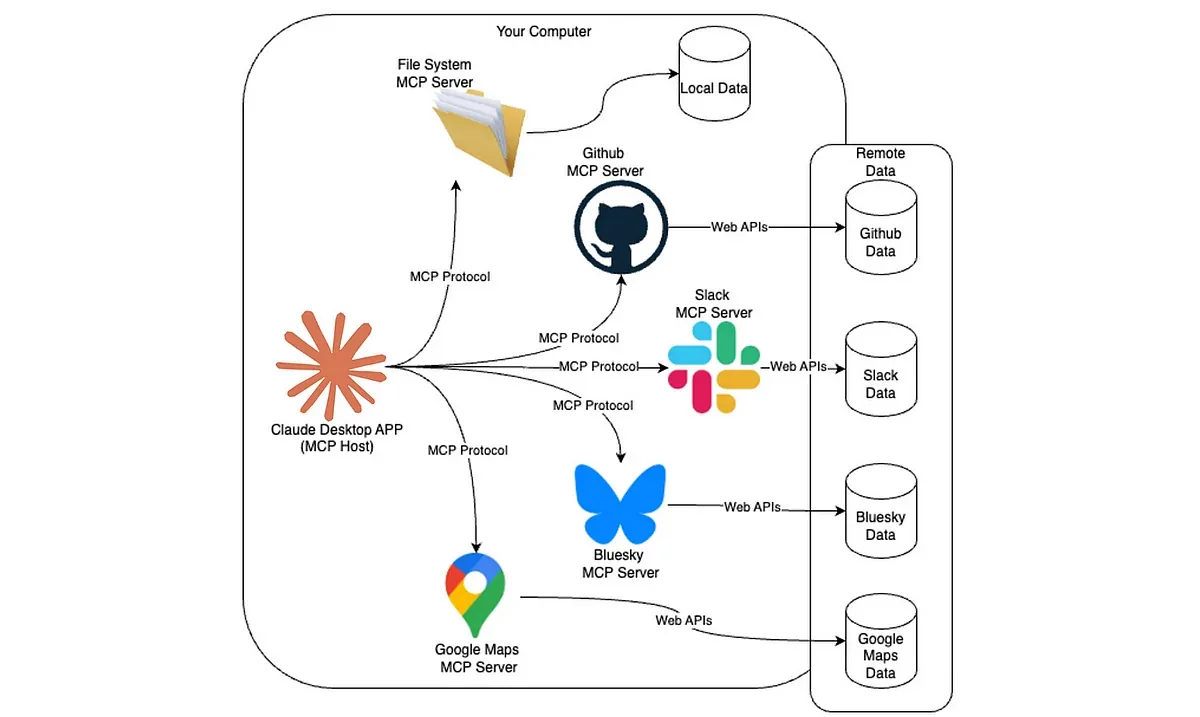
- Host: the AI application that contains the model (Claude Desktop, Cursor, your own agent).
- MCP client: the part of the host that keeps one connection to one server.
- MCP server: a small program that exposes some system (a database, GitHub, your files) through MCP.
- A server can offer three kinds of things:
- Tools: functions the model can call to do something.
- Resources: read-only data loaded as context (files, records).
- Prompts: reusable prompt templates.
- Tool schema: the name, description and JSON parameters the model reads to decide when to call a tool.
- JSON-RPC: the message format between client and server.
- Transport: how messages travel: stdio (a local child process) or Streamable HTTP (remote servers).
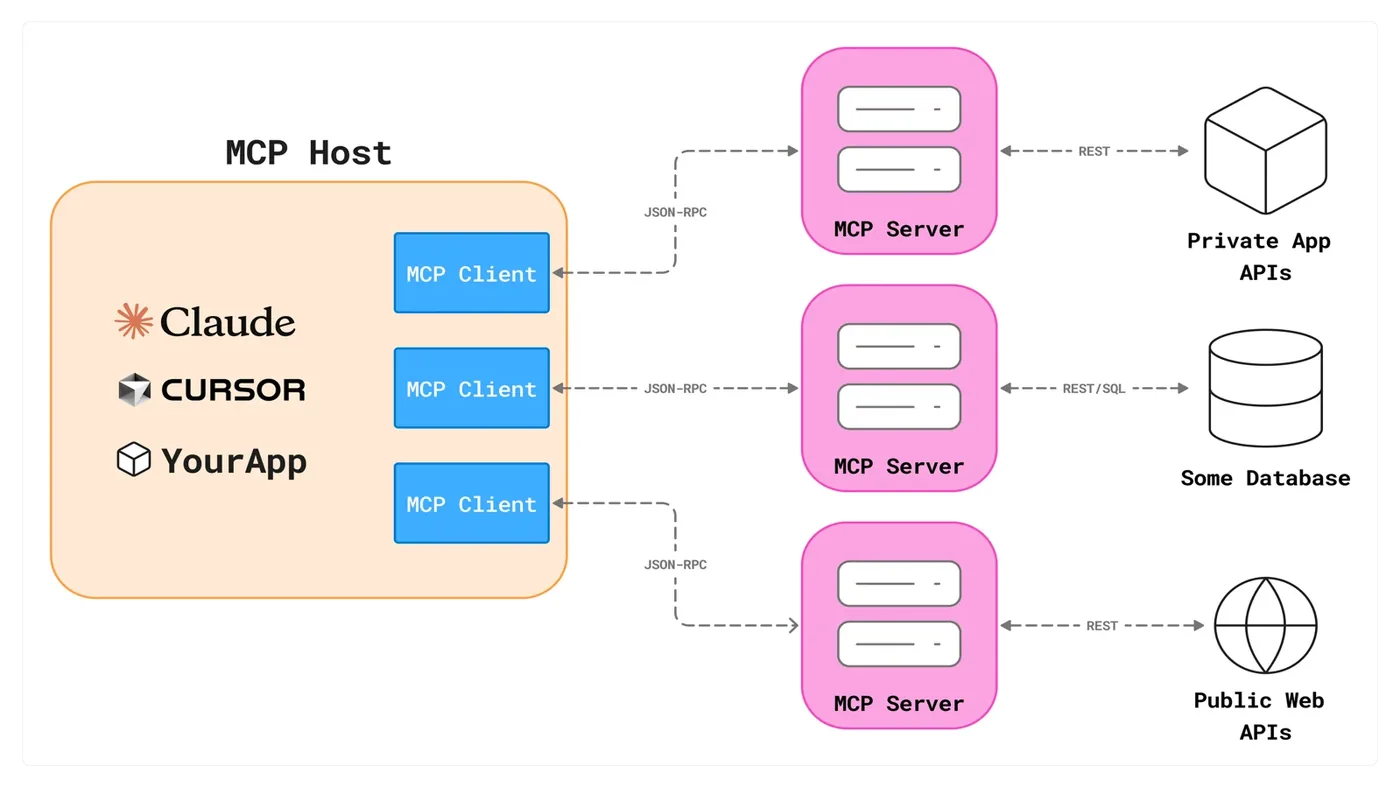
The model itself never connects to a server. The client asks the server for its tool list, and the host gives those schemas to the model just like ordinary tool calling (Session 24). When the model asks for a tool, the host forwards the call through the client to the server, and the result flows back. MCP standardises the plumbing, not the model.
Build a server
With the official Python SDK, a server is a few decorated functions. The type hints become the JSON schema and the docstring becomes the description the model reads, exactly like the schema-from-a-function idea in Session 24. We expose two tools, one resource and one prompt template:
# study_server.py
from mcp.server.fastmcp import FastMCP

mcp = FastMCP("study-tools")

MARKS = {"ali": {"physics": 72, "chemistry": 65, "biology": 80},
         "sara": {"physics": 88, "chemistry": 91, "biology": 85}}

@mcp.tool()
def average_marks(student: str) -> float:
    """Average of a student's marks across all subjects."""
    marks = MARKS[student.lower()]
    return round(sum(marks.values()) / len(marks), 1)

@mcp.tool()
def add(a: int, b: int) -> int:
    """Add two whole numbers."""
    return a + b

@mcp.resource("students://list")
def list_students() -> str:
    """The names of all students on file."""
    return ", ".join(sorted(MARKS))

@mcp.prompt()
def revision_plan(subject: str) -> str:
    """A reusable prompt template for a revision plan."""
    return f"Make a 7-day revision plan for {subject} for an FSc student. Keep each day to two lines."

if __name__ == "__main__":
    mcp.run()          # stdio transport by default
(In the newest versions of the SDK the class may be named differently, so check the current documentation. The ideas are the same.)
Connect a client
The client starts the server as a child process, then discovers what it offers at run time. Nothing about the tools is hard-coded in the client. This is the big difference from hand-wired function calling.
import asyncio, os, sys
from mcp import ClientSession, StdioServerParameters
from mcp.client.stdio import stdio_client

async def main():
    # the client starts the server as a child process and talks to it over stdin/stdout
    params = StdioServerParameters(command=sys.executable, args=["study_server.py"])
    async with stdio_client(params) as (read, write):
        async with ClientSession(read, write) as session:
            await session.initialize()

            tools = await session.list_tools()                      # discovery at RUN time, not hard-coded
            print("tools the server offers:")
            for t in tools.tools:
                print(f"   {t.name}: {t.description}   inputs: {list(t.inputSchema['properties'])}")

            result = await session.call_tool("average_marks", {"student": "Sara"})
            print("\ncalled average_marks('Sara') ->", result.content[0].text)

            resources = await session.list_resources()
            print("\nresources:", [str(r.uri) for r in resources.resources])
            doc = await session.read_resource("students://list")
            print("read students://list ->", doc.contents[0].text)

            prompt = await session.get_prompt("revision_plan", {"subject": "Chemistry"})
            print("\nprompt template filled in:", prompt.messages[0].content.text)

asyncio.run(main())tools the server offers:
average_marks: Average of a student's marks across all subjects. inputs: ['student']
add: Add two whole numbers. inputs: ['a', 'b']
called average_marks('Sara') -> 88.0
resources: ['students://list']
read students://list -> ali, sara
prompt template filled in: Make a 7-day revision plan for Chemistry for an FSc student. Keep each day to two lines.Read the output as a conversation. The client asked the server what tools it has and got average_marks and add, each with its description and input names. It called average_marks('Sara') and got 88.0 (the mean of 88, 91 and 85). It listed the server's resources and read students://list, getting "ali, sara". And it asked for the revision_plan prompt with the subject Chemistry and received the filled-in template, ready to send to a model. In a real host like Claude Desktop or Cursor, the client is built in and you only register the server in a configuration file:
{
  "mcpServers": {
    "study-tools": { "command": "python", "args": ["/path/to/study_server.py"] }
  }
}
What is really on the wire
MCP messages are plain JSON-RPC 2.0, one JSON object per line over stdin and stdout for local servers. To prove it, here is a script that skips the SDK, starts the same server, and speaks the protocol by hand:
import json, os, subprocess, sys

server = subprocess.Popen([sys.executable, "study_server.py"],
                          stdin=subprocess.PIPE, stdout=subprocess.PIPE, stderr=subprocess.DEVNULL, text=True)

def send(message):
    server.stdin.write(json.dumps(message) + "\n"); server.stdin.flush()
def receive():
    return json.loads(server.stdout.readline())

# 1) handshake
send({"jsonrpc": "2.0", "id": 1, "method": "initialize",
      "params": {"protocolVersion": "2024-11-05", "capabilities": {}, "clientInfo": {"name": "demo", "version": "0"}}})
init = receive()["result"]
print("server says:", init["serverInfo"]["name"], "| protocol", init["protocolVersion"])
send({"jsonrpc": "2.0", "method": "notifications/initialized"})

# 2) ask what tools exist
send({"jsonrpc": "2.0", "id": 2, "method": "tools/list"})
tool = receive()["result"]["tools"][0]
print("\nfirst tool as the LLM sees it:")
print(json.dumps({k: tool[k] for k in ("name", "description", "inputSchema")}, indent=2))

# 3) call it
request = {"jsonrpc": "2.0", "id": 3, "method": "tools/call", "params": {"name": "add", "arguments": {"a": 23, "b": 47}}}
print("\nrequest :", json.dumps(request))
send(request)
print("response:", json.dumps(receive()["result"]["content"]))
server.terminate()server says: study-tools | protocol 2024-11-05
first tool as the LLM sees it:
{
"name": "average_marks",
"description": "Average of a student's marks across all subjects.",
"inputSchema": {
"properties": {
"student": {
"title": "Student",
"type": "string"
}
},
"required": [
"student"
],
"title": "average_marksArguments",
"type": "object"
}
}
request : {"jsonrpc": "2.0", "id": 3, "method": "tools/call", "params": {"name": "add", "arguments": {"a": 23, "b": 47}}}
response: [{"type": "text", "text": "70"}]The exchange has three steps. First a handshake (initialize), where server and client agree on a protocol version and the server announces itself as study-tools. Then tools/list, which returns each tool exactly as the model will see it: a name, a description and an inputSchema in JSON Schema form, built automatically from our type hints and docstring. Finally tools/call with {"name": "add", "arguments": {"a": 23, "b": 47}}, answered with [{"type": "text", "text": "70"}]. That is the entire protocol for tools. There is nothing hidden.
The shape of every request, as JSON:
{"jsonrpc": "2.0", "id": 3, "method": "tools/call", "params": {"name": "add", "arguments": {"a": 23, "b": 47}}}Every request has a method (initialize, tools/list, tools/call, resources/read, prompts/get and so on), parameters and an id so the reply can be matched to it. Notifications, such as notifications/initialized, have no id and expect no reply.
How MCP hides the API behind a tool
An API is built for developers: it differs per service, and each app needs custom code for it. MCP is a single, self-describing protocol built for AI apps, with tools discovered at run time. It does not replace APIs. An MCP server usually wraps one:
- The model sees only the tool's name, description and schema, never the endpoint, headers or internal logic.
- Credentials stay inside the server. API keys never enter the prompt, so they cannot be leaked by a model that is tricked into repeating its context.
- The backend can change without changing the host or the model.
| Plain function calling | MCP | |
|---|---|---|
| Tool definitions | Written into each app | Served by the server, discovered at run time |
| Reuse across apps | Rewrite for each one | Write the server once |
| Ready-made integrations | Few | Growing library of servers (files, GitHub, Slack, databases) |
| Best when | One app, a few simple tools | Many apps share tools, or users plug in their own |
Skip MCP for a single app with a couple of simple tools, where ordinary function calling is simpler. Use it when many apps need the same tools, when you want ready-made servers, or when users should bring their own.
Security: a bigger surface
A standard that makes it easy to plug in tools also makes it easy to plug in bad ones. Take these seriously:
- Prompt injection through tool results. Text returned by a tool is data, never instructions. A web page or email fetched by a tool can contain hidden commands (Session 21).
- Tool poisoning. A malicious server can hide instructions inside a tool's description, which the model reads as trusted text. Use only servers you trust, and review what they declare.
- Least privilege. Give each server the minimum access, preferably read-only.
- Authentication. Use scoped OAuth tokens for remote servers, and take the user's identity from the session, never from the model.
- Human approval before destructive actions (delete, pay, send).
- Sandbox local servers. A stdio server runs code with your permissions, so treat installing one like installing any program.
MCP was announced by Anthropic in November 2024 as an open standard. It was then adopted by other major AI developers and tool makers, and in December 2025 Anthropic donated it to a Linux Foundation project, the Agentic AI Foundation.Anthropic and Linux Foundation announcements
What problem does MCP mainly solve?
What is "tool poisoning" in MCP?
Try it yourself
- Add a tool
best_subject(student: str) -> strto the server. Re-runclient.py. Do you need to change the client? - Add a resource
students://{name}that returns one student's marks. (Hint: the resource decorator accepts a URI template.) - Write a second server for a different data source, such as a file of past-paper questions, and connect both servers from one host.
- In
raw_jsonrpc.py, call a tool that does not exist. What error does the server send back?
Part V complete: what you can do now
You can explain how a Transformer works, how an LLM is built and shrunk, how to call it through an API or run it locally, how to ground it in your own documents with RAG, how to let it call your functions safely and how to plug tools in through MCP. That is the whole toolbox of a modern AI application.
Part VI turns these pieces into systems. Session 26 introduces the frameworks (LangChain and LlamaIndex) that organise chains, prompts, indexes and retrieval, and after that come stateful graphs and agents that decide their own next step.
Frequently asked questions
What is the Model Context Protocol (MCP)?
MCP is an open standard for connecting AI applications to tools, data and prompt templates. A tool is wrapped once as an MCP server, and any MCP-compatible app (a host) can discover and use it, so developers do not have to write a custom integration for every app and tool pair.
What is the difference between MCP and function calling?
Function calling is how a model asks for an action in one application, and the tool definitions live in that app's code. MCP standardises how tools are packaged and discovered across applications. In practice an MCP host passes the discovered tool schemas to the model through ordinary tool calling.
What are tools, resources and prompts in MCP?
Tools are functions the model can call to do things. Resources are read-only data, such as files or records, loaded as context. Prompts are reusable templates the server offers. A single server can provide all three.
How does an MCP client talk to a server?
With JSON-RPC 2.0 messages. For local servers they travel over stdio, with the client starting the server as a child process. Remote servers use Streamable HTTP. The client sends requests such as tools/list and tools/call, and the server replies.
Is MCP safe to use?
It is as safe as the servers you connect and the permissions you grant. Use trusted servers, give minimal and preferably read-only access, treat tool output as data and not instructions, require approval for destructive actions, and watch for tool poisoning in tool descriptions.