A CNN from Session 16 can say "this photo contains a bus". That is classification. A self-driving car, a security camera or a farm drone needs more: where is the bus, how many pedestrians are there, and where exactly are they standing? That is object detection, and the model family that made it fast enough for live video is YOLO, short for You Only Look Once.
This is the optional deep-dive of Part IV. If you only want the main road, you can skip to Session 18. But YOLO is the single most practical computer-vision tool a beginner can run, and this session lets you do it in a dozen lines of code. We run a real pre-trained model on a real photo and then open up the three ideas that make its boxes meaningful: confidence, IoU and non-max suppression.
Classification, detection and segmentation
Computer-vision tasks differ in how much detail they give you:
- Classification: one label for the whole image ("bus").
- Object detection: a label and a rectangle for each object ("bus here, person there, person there").
- Instance segmentation: the exact pixels of each object, not just a rectangle.
- Pose estimation: key points on a body, such as shoulders, elbows and knees.
- Tracking: following detected objects across video frames.
Older detectors worked in two stages: propose thousands of regions, then classify each. YOLO's key idea, from the 2015 paper by Joseph Redmon and colleagues, is to do everything in one forward pass of a single CNN. The image is divided into a grid, and each grid cell predicts boxes and class scores directly. One look, all the answers.
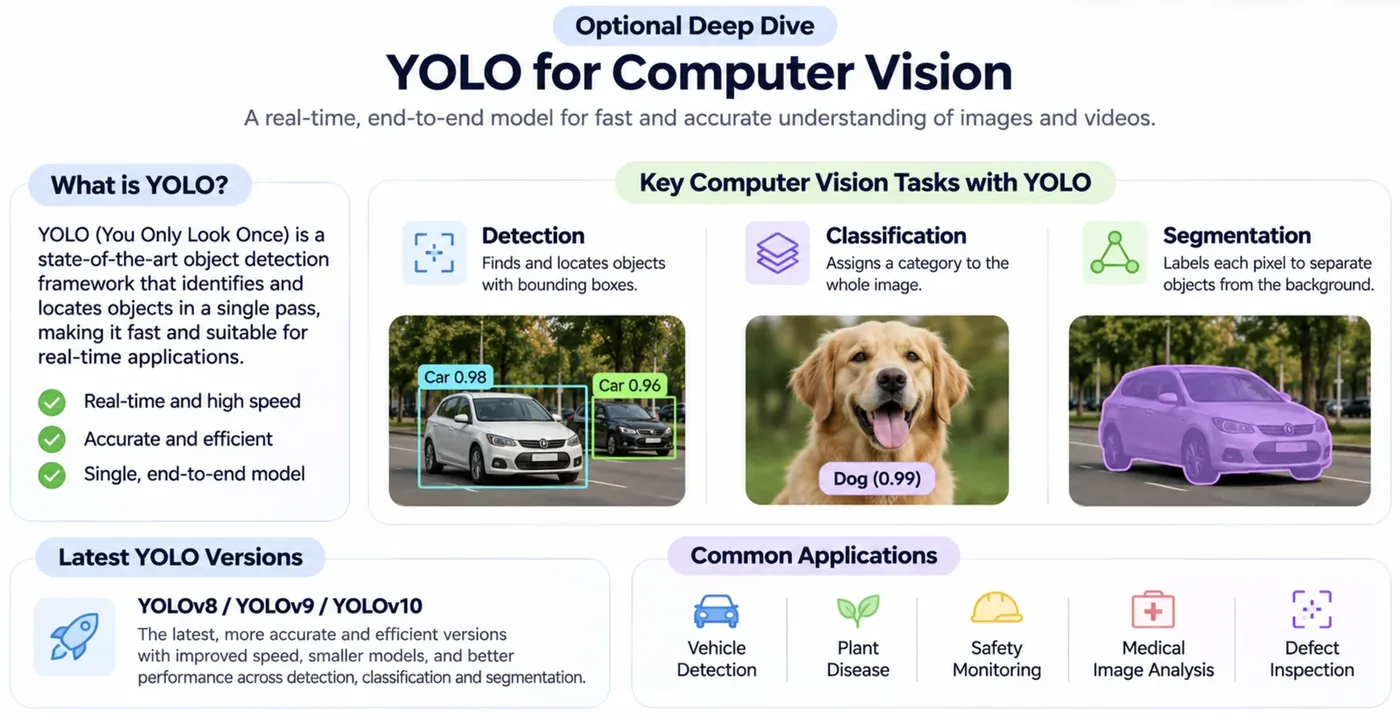
The original YOLO paper reported processing images at 45 frames per second, with a smaller version reaching 155 fps, when real-time detection was out of reach for most systems.Redmon et al., You Only Look Once, 2015
Run it: detect objects in a photo
The Ultralytics library packages YOLO models so that a pre-trained one runs in a few lines. We use yolo11n, the smallest YOLO11 model (the "n" is for nano), trained on COCO, a large dataset covering 80 everyday object classes. The first run downloads the weights, about 5 MB. The photo is a sample image that ships with the library.
import numpy as np
from PIL import Image
from ultralytics import YOLO
from ultralytics.utils import ASSETS

model = YOLO("yolo11n.pt")                         # the smallest YOLO11 model, pre-trained on COCO
image = ASSETS / "bus.jpg"                         # a sample photo that ships with the library

results = model(image, verbose=False)
boxes = results[0].boxes
print(f"image size: {results[0].orig_shape[1]} x {results[0].orig_shape[0]} pixels")
print(f"{len(boxes)} objects found:\n")
print("class     confidence   box (x1, y1, x2, y2)")
for b in boxes:
    x1, y1, x2, y2 = [round(v) for v in b.xyxy[0].tolist()]
    print(f"{model.names[int(b.cls)]:8s}  {float(b.conf):.2f}        ({x1}, {y1}, {x2}, {y2})")

print("\nmodel size:", f"{sum(p.numel() for p in model.model.parameters()):,}", "parameters;", len(model.names), "classes it knows")image size: 810 x 1080 pixels
5 objects found:
class confidence box (x1, y1, x2, y2)
bus 0.94 (4, 229, 796, 728)
person 0.89 (671, 395, 810, 879)
person 0.88 (47, 400, 239, 904)
person 0.86 (223, 409, 344, 860)
person 0.62 (0, 556, 69, 872)
model size: 2,616,248 parameters; 80 classes it knows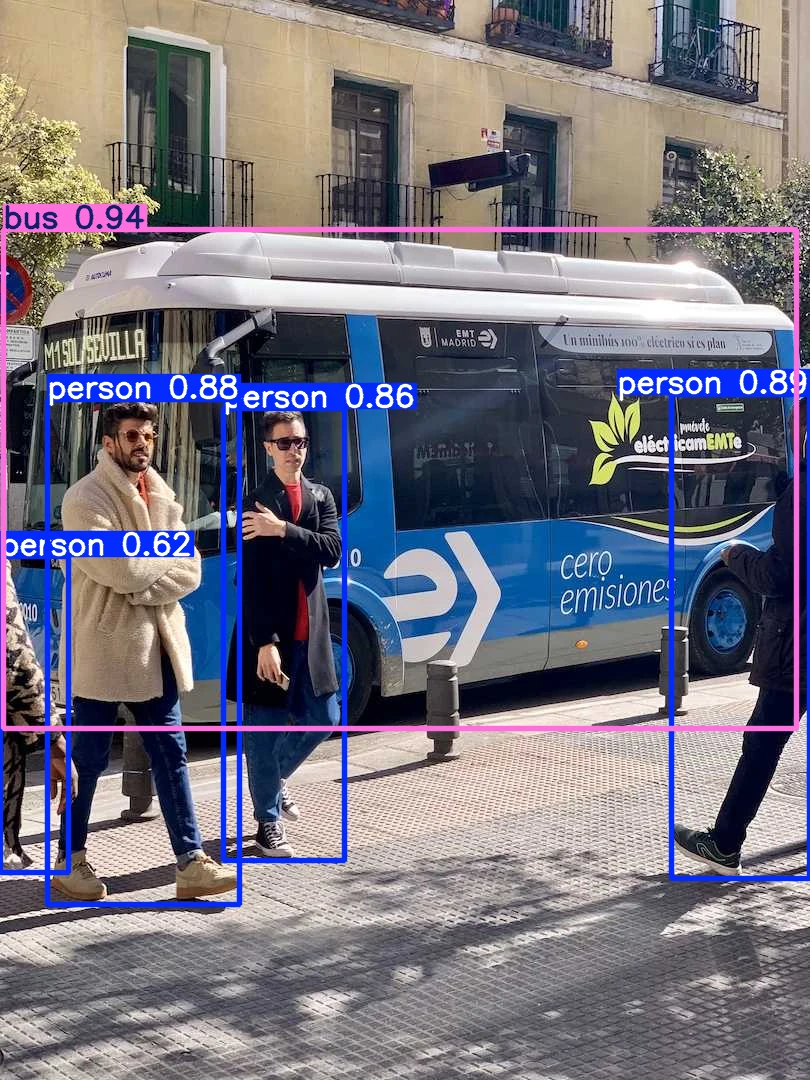
Read the table. In a 810 by 1080 photo it found 5 objects: a bus (confidence 0.94) and four people (0.89, 0.88, 0.86 and 0.62). Each box is four numbers, the pixel positions of its top-left corner and bottom-right corner. The whole model has 2,616,248 parameters, small enough to run on a phone, and it recognises 80 classes.
In the image, the confidence next to each label is the model's estimate of how sure it is. The 0.62 person at the left edge is partly cut off by the frame, and the model is correspondingly less sure.
The three ideas inside every detector
1. Boxes and their formats
A box can be stored as its two corners, (x1, y1, x2, y2), or as a centre point plus width and height, (x, y, w, h). YOLO's training labels use the second form, normalised by the image size so that every number lies between 0 and 1, which makes labels independent of resolution.
2. Confidence
Each predicted box carries a confidence score. In the original YOLO this is the model's belief that the box contains an object, multiplied by how well the box fits that object. Combined with the class probability, you get the score you see on screen. You choose a confidence threshold and discard everything below it.
from ultralytics import YOLO
from ultralytics.utils import ASSETS

model = YOLO("yolo11n.pt")
image = ASSETS / "bus.jpg"

# 1. the confidence threshold decides how many boxes you keep
for conf in (0.05, 0.25, 0.7):
    n = len(model(image, conf=conf, verbose=False)[0].boxes)
    print(f"confidence threshold {conf:<5} -> {n} boxes kept")

# 2. IoU: how much do two boxes overlap?
def iou(a, b):
    ix1, iy1, ix2, iy2 = max(a[0], b[0]), max(a[1], b[1]), min(a[2], b[2]), min(a[3], b[3])
    inter = max(0, ix2 - ix1) * max(0, iy2 - iy1)
    area = lambda r: (r[2] - r[0]) * (r[3] - r[1])
    return inter / (area(a) + area(b) - inter)

truth = (50, 400, 240, 900)                        # a hand-drawn "ground truth" box around the left person
good  = (47, 400, 239, 904)                        # the model's box for that person
poor  = (150, 450, 340, 950)                       # a box shifted sideways and down
print("\nIoU of the model's box with the truth :", round(iou(truth, good), 3))
print("IoU of a badly placed box with the truth:", round(iou(truth, poor), 3))confidence threshold 0.05 -> 11 boxes kept
confidence threshold 0.25 -> 5 boxes kept
confidence threshold 0.7 -> 4 boxes kept
IoU of the model's box with the truth : 0.972
IoU of a badly placed box with the truth: 0.271The threshold is a precision versus recall dial (Session 4). At 0.05 the model keeps 11 boxes, many of them dubious. At the default 0.25 it keeps 5, and at 0.7 only 4, losing the less certain person. Set it low if missing an object is costly, high if false alarms are.
3. IoU: how good is a box?
How do you score a predicted box against the true one? The standard measure is Intersection over Union (IoU): the area where the two boxes overlap divided by the total area they cover together.
IoU is 1 for identical boxes and 0 for boxes that do not touch. A common rule of thumb counts a detection as correct when IoU is at least 0.5 with the true box. In the printout above, a box from the model has IoU 0.972 with a hand-drawn "true" box (a near-perfect match), while a box shifted sideways and down drops to 0.271.
IoU is used in two places. During training, it measures how good a predicted box is. During evaluation, it decides whether a detection counts as a correct hit.
4. Non-max suppression (NMS)
A detector often proposes several overlapping boxes for the same object. Non-max suppression cleans this up: keep the highest-confidence box, throw away any other box of the same class whose IoU with it is above a threshold (say 0.7), then repeat with what is left. The result is one box per object. (The IoU threshold is another setting you can tune, and it is the iou argument in the Ultralytics call.)
Detectors are usually reported with mAP (mean average precision). For each class, compute the area under its precision-recall curve (Session 4's ideas, applied to boxes where a hit means IoU above a threshold), then average over classes. You will see it written as mAP@0.5, or mAP@0.5:0.95 when the IoU threshold is averaged over a range.
Two boxes are exactly the same size and one is shifted so that they overlap by half of each box's area. What is their IoU, roughly?
More than boxes: segmentation and pose
The same family does more tasks by changing the output head. Here is the same bus photo with three different models:
import matplotlib.pyplot as plt
from ultralytics import YOLO
from ultralytics.utils import ASSETS

image = ASSETS / "bus.jpg"
fig, ax = plt.subplots(1, 3, figsize=(11, 4.6))
for a, (weights, title) in zip(ax, [("yolo11n.pt", "detection"), ("yolo11n-seg.pt", "segmentation"), ("yolo11n-pose.pt", "pose estimation")]):
    result = YOLO(weights)(image, verbose=False)[0]
    a.imshow(result.plot()[..., ::-1]); a.set_title(title); a.axis("off")
    kind = "masks" if result.masks is not None else ("keypoints" if result.keypoints is not None and result.keypoints.xy.numel() else "boxes")
    print(f"{title:16s} found {len(result.boxes)} objects; extra output: {kind}")
fig.tight_layout()detection found 5 objects; extra output: boxes
segmentation found 6 objects; extra output: masks
pose estimation found 4 objects; extra output: keypoints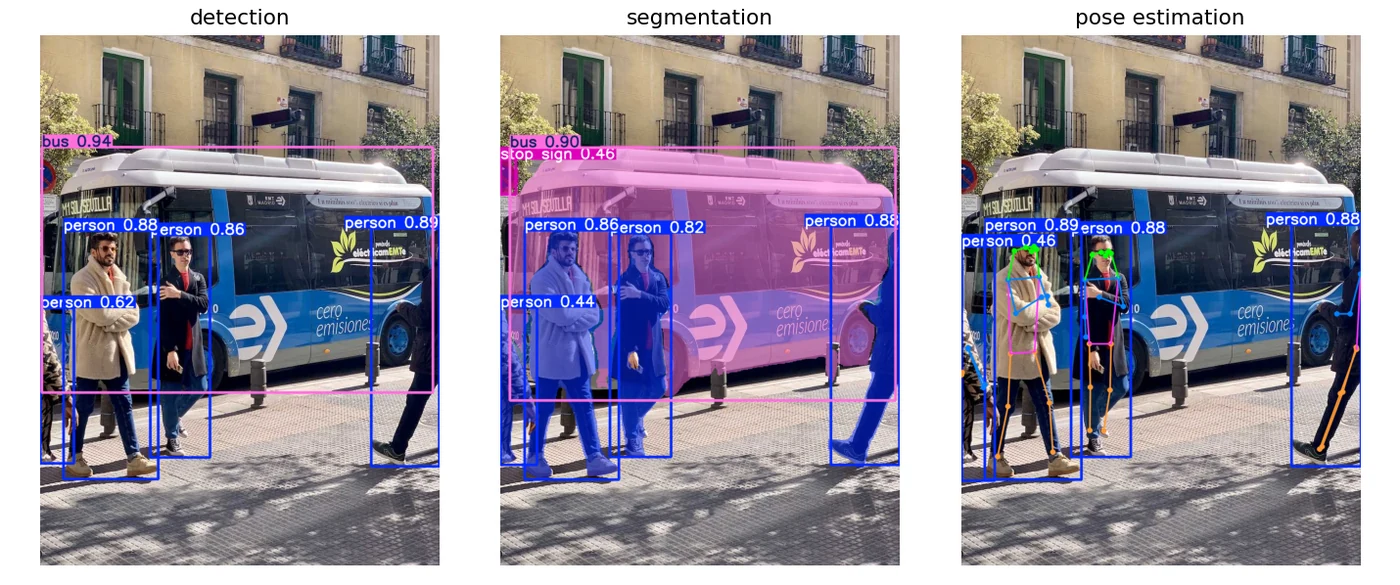
The detection model draws boxes. The segmentation model, yolo11n-seg, additionally returns a pixel mask for each object (and finds 6 objects here, one more than the detector, so be aware that different models disagree). The pose model, yolo11n-pose, finds 4 people and marks body key points, which is how fitness apps and sports analysis track movement.
The COCO dataset that most YOLO models are trained on contains over 330,000 images and defines 80 object categories, from "person" and "bus" to "toothbrush".COCO dataset, Lin et al., 2014
Using it, and fine-tuning on your own data
from ultralytics import YOLO

model = YOLO("yolo11n.pt")                       # a small pre-trained model (downloaded on first use)
results = model("street.jpg")                    # also accepts a video path or a webcam index
for box in results[0].boxes:
    print(model.names[int(box.cls)], float(box.conf), box.xyxy.tolist())
results[0].save(filename="street_out.jpg")       # image with the boxes drawn

# fine-tune on your own labelled images (transfer learning, Session 1)
# model.train(data="my_dataset.yaml", epochs=50, imgsz=640)
Notice how the last line connects back to transfer learning from Session 1: you start from weights already trained on COCO and teach the model your own objects, for example your shop's products or crop diseases, with a few hundred labelled photos instead of millions. Labelling images is the real work, and tools such as Roboflow or Label Studio help.
Pick the model size by where it will run. n (nano) and s (small) suit phones and edge devices. m, l and x are bigger, slower and more accurate. Ultralytics has also released newer generations after YOLO11, so check the documentation for the current names, since the field moves quickly.
Limits to remember
- A detector only knows the classes it was trained on. The COCO model cannot find a "rickshaw" until you fine-tune it on rickshaws.
- Small, distant or heavily overlapping objects are hard.
- Confidence is not truth. A model can be 90 percent confident and wrong.
- Vision only. YOLO knows nothing about order in time unless you add tracking.
Try it yourself
- Run
detect.pyon a photo of your own (a classroom, a street, a market). Which objects does it miss? Does loweringconffind them? - In
confidence_and_iou.py, compute the IoU of two boxes that overlap by exactly half. Does it match the quiz answer? - Run
three_tasks.pywithyolo11s.pt(small) instead of nano. What changes in speed and in the number of objects found? - Try a video: pass a short
.mp4path to the model and count how many frames contain a person.
What comes next
YOLO is an application of the CNN idea. The wall of the CNN is that it reads a fixed grid and has no memory of order, so it cannot read a sentence or forecast tomorrow's price. Session 18 builds networks with memory: the recurrent neural network.
Frequently asked questions
What does YOLO stand for and how does it work?
YOLO stands for You Only Look Once. It is a family of object detectors that find and label all the objects in an image with a single pass through one CNN. The image is divided into a grid, and the network predicts boxes, confidence scores and class probabilities directly, which makes it fast enough for real-time video.
What is the difference between image classification and object detection?
Classification gives one label for the whole image. Object detection finds each object in the image and gives it a label and a bounding box showing where it is.
What is IoU in object detection?
Intersection over Union is the area where a predicted box and a true box overlap divided by the area they cover together. It ranges from 0 to 1 and is used both to train detectors and to decide whether a detection counts as correct, commonly at a threshold of 0.5.
What is non-max suppression?
A detector can produce several overlapping boxes for the same object. Non-max suppression keeps the box with the highest confidence and removes other boxes of that class that overlap it too much, leaving one box per object.
Can I train YOLO on my own objects?
Yes. Start from a pre-trained model, prepare a dataset of labelled images with boxes, and fine-tune it with the model.train call. Because it starts from weights already trained on millions of images, a few hundred well-labelled images are often enough for a useful model.